Portfolio Website
In ProgressOverview
This site is a from-scratch portfolio designed for three distinct audiences: recruiters scanning for credentials, hiring managers evaluating technical depth, and general visitors browsing freely. The build process started with a requirements document, a weighted hosting comparison, and a site map — then moved into implementation using Astro 5 as a static site generator deployed on Cloudflare Pages.
A downloadable runbook covering the full implementation is available for anyone looking to replicate or learn from the process:
Download the Complete Portfolio Website Runbook (PDF)
Pre-Planning and Requirements
Before writing any code, a requirements framework was drafted covering information architecture, visual design constraints, content inventory, accessibility targets, and performance goals.
Core requirements included:
- Progressive disclosure — show small, high-signal surface area first, with depth behind clear entry points
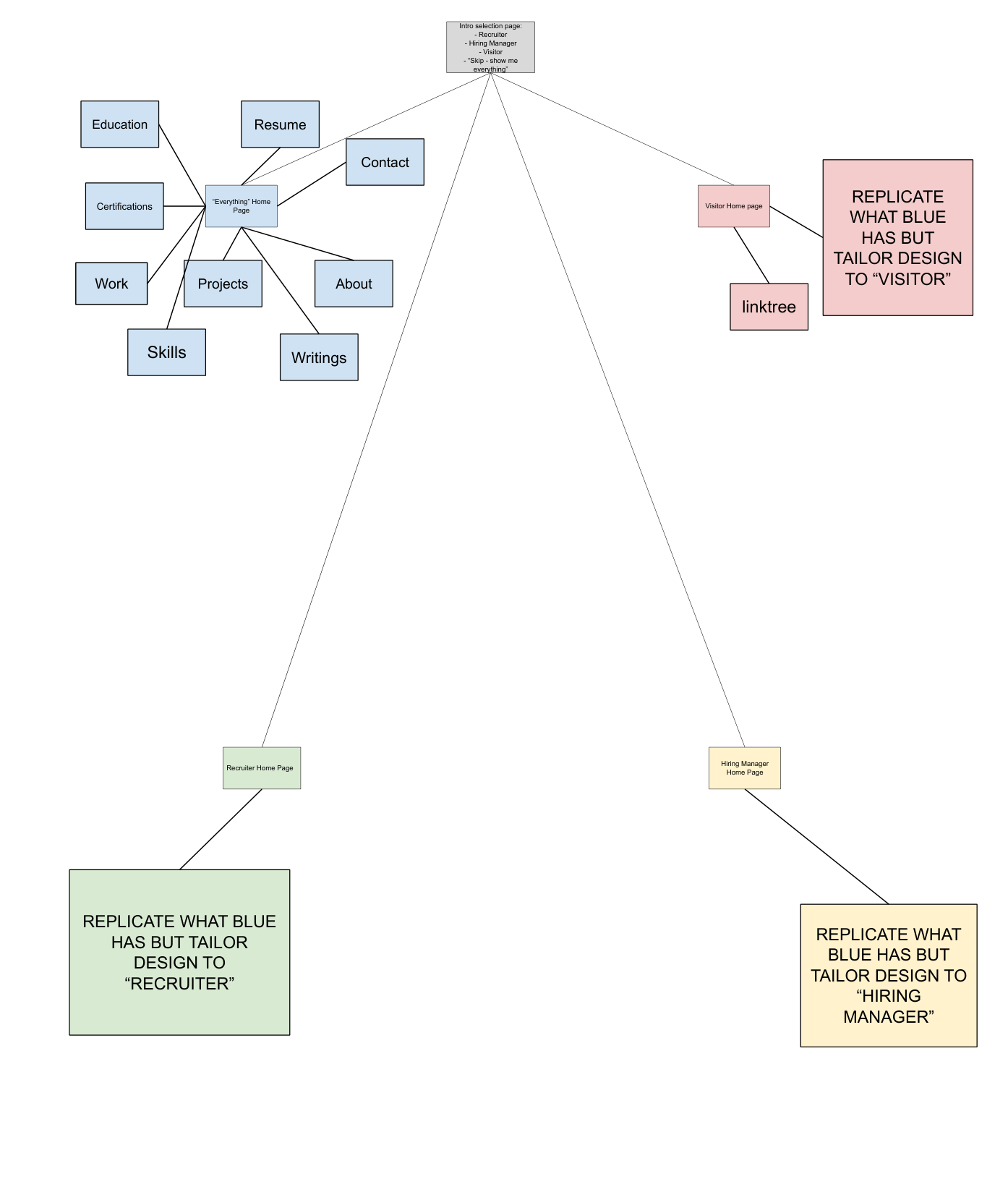
- Role gate — visitors self-select as Recruiter, Hiring Manager, or Visitor; the home page reorders sections and highlights relevant tiles per role, with a “Skip — show me everything” default
- Above-the-fold hierarchy — scannable in an F-pattern: name, role wedge, positioning statement, proof bullets, and one-click access to Resume and Contact
- Category page “rabbit hole” mechanic — each section starts with a TL;DR panel, then shows Level 1 entries (cards/list rows), each expanding into Level 2 depth
- Top-level navigation capped at 5 items: Work, Projects, Writing, Skills, About — with Resume and Contact as utility actions
The site flow diagram below shows how the role gate branches into four distinct home page variants — Recruiter, Hiring Manager, Visitor, and “Everything” (default) — each leading to the same shared pages but with different content ordering and emphasis.
Supporting documents:
- Requirements Document (PDF) — full framework covering layout, typography, accessibility, content types, and tech stack modeling
Hosting Decision
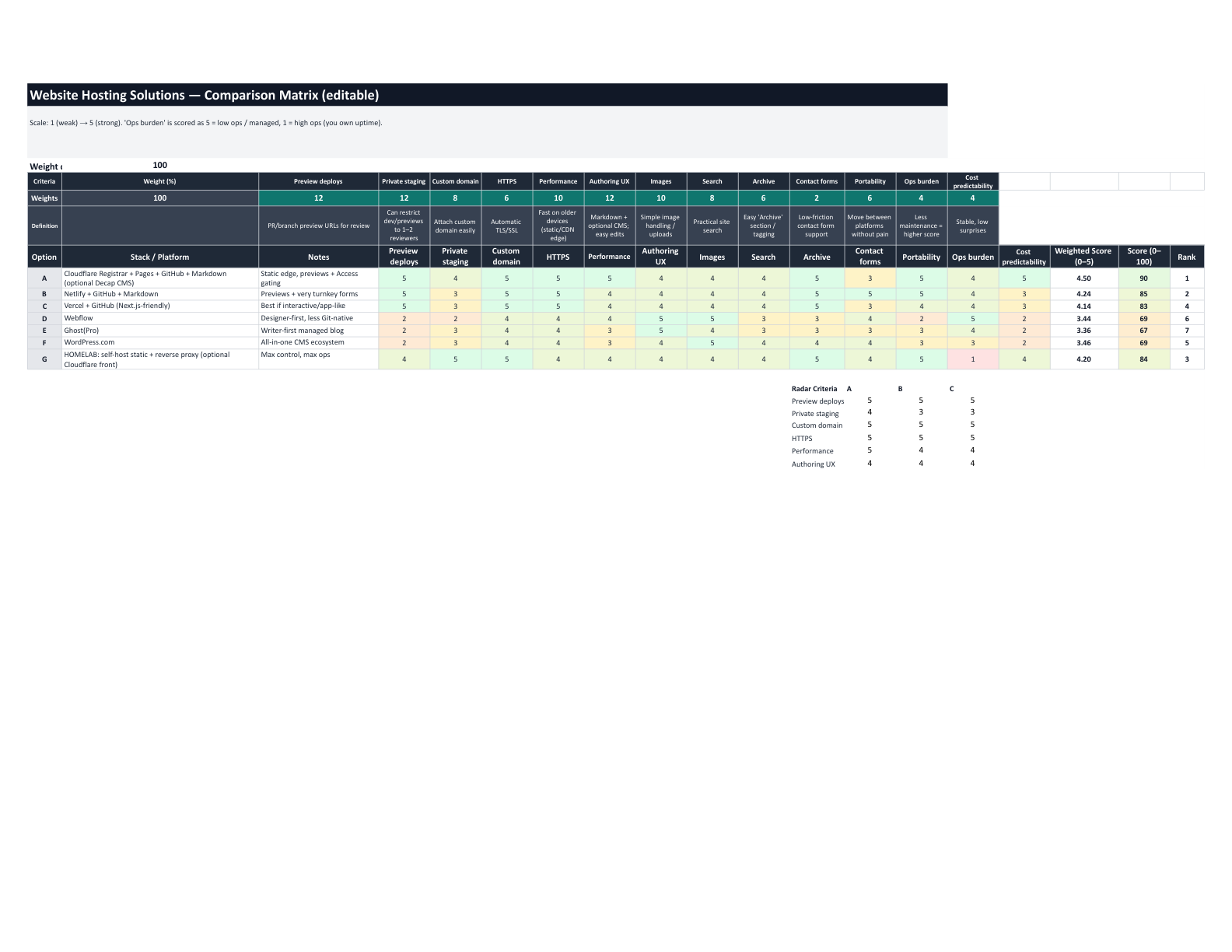
A weighted comparison matrix evaluated 7 hosting options across 13 criteria (preview deploys, private staging, custom domain, HTTPS, performance, authoring UX, images, search, archive, contact forms, portability, ops burden, and cost predictability). Each criterion was weighted by importance to the project goals.
| Rank | Platform | Weighted Score |
|---|---|---|
| 1 | Cloudflare Pages + GitHub + Markdown | 90 / 100 |
| 2 | Netlify + GitHub + Markdown | 85 / 100 |
| 3 | Homelab: self-host + reverse proxy | 84 / 100 |
| 4 | Vercel + GitHub (Next.js-friendly) | 83 / 100 |
| 5 | WordPress.com | 69 / 100 |
| 6 | Webflow | 69 / 100 |
| 7 | Ghost(Pro) | 67 / 100 |
Cloudflare Pages scored highest due to static edge performance, PR/branch preview deployments, private staging via Cloudflare Access, custom domain with automatic HTTPS, high portability (Git + Markdown), and a predictable cost model ($0/month excluding domain at ~$10.46/year).
Each platform was also mapped to a simplified architecture strip showing the end-to-end flow from domain registration through hosting, content management, forms, and access control.
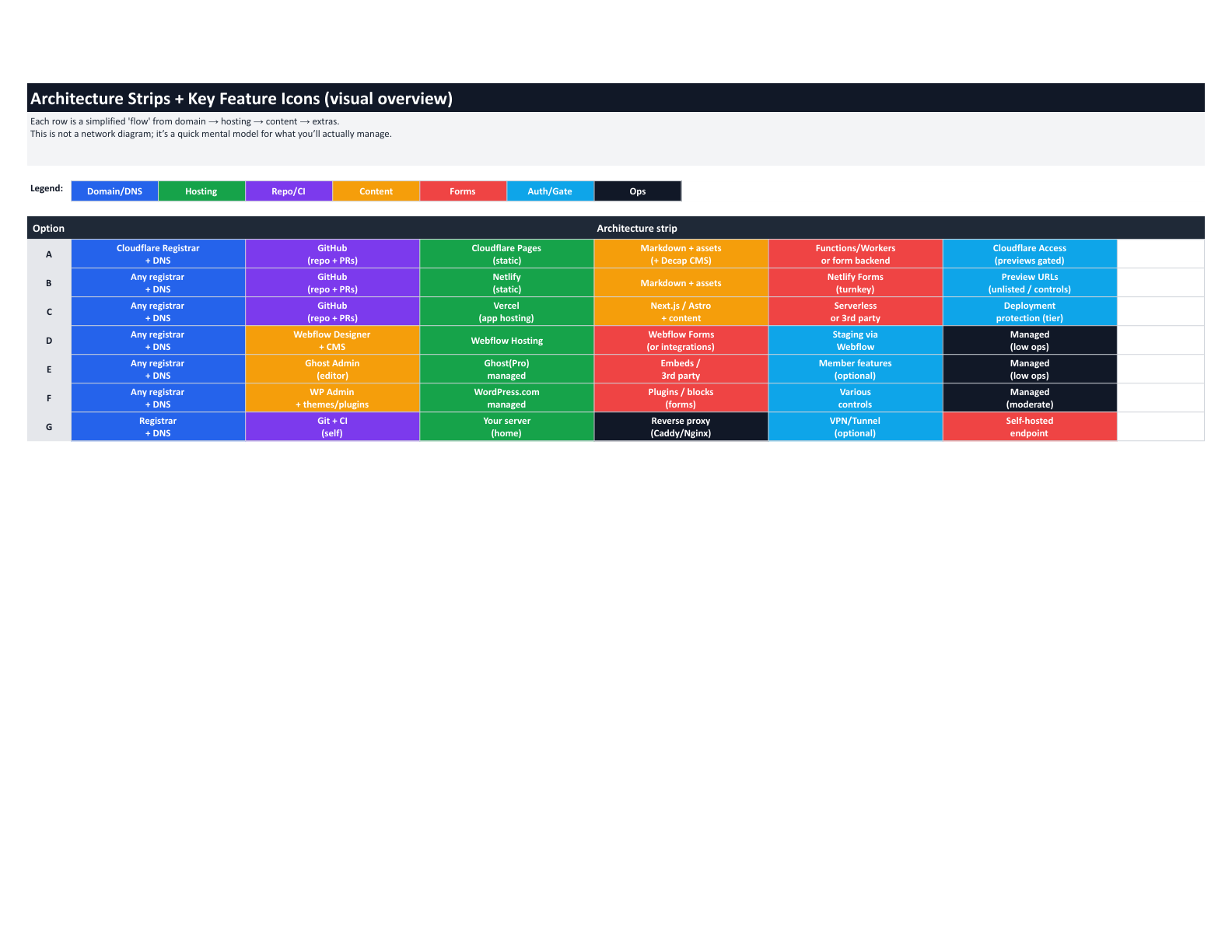
The full comparison with detailed pros/cons, architecture breakdowns, and source references is available:
Design System
The visual design follows a Trust + Clarity theme over stereotypical aesthetics. Requirements enforced during implementation:
- Color roles defined as CSS custom properties (
--bg,--surface,--text,--muted,--border,--accent,--focus-ring,--success,--warn,--error) to prevent random color usage - One accent color — a calming blue used sparingly for actions and highlights, with neutral colors doing most of the work
- Typography — body text at 16–18px equivalent, line height at 1.5–1.6, long-form content constrained to 65–80ch max, one sans-serif for prose paired with one monospace for code
- 8px spacing rhythm — all spacing decisions aligned to a 4/8px grid following Material Design 8dp guidance
- WCAG AA contrast — minimum 4.5:1 for body text, enforced during palette selection for both light and dark themes
- Dark mode — full dark theme via
[data-theme="dark"]overrides on all design tokens, withlocalStoragepersistence and system preference detection
Architecture
The site is fully static HTML generated at build time. Two client-side systems add interactivity without frameworks:
- Theme toggle —
localStorage('theme')setsdata-theme="dark"on<html>. An anti-flash inline script in<head>applies the attribute before first paint. - Role gate —
sessionStorage('visitor-role')setsdata-roleon<html>. CSSorderproperties reorder home page sections, and role-specific accent borders highlight priority tiles per audience.
Both systems compose independently and the site works fully without JavaScript (default light theme, default “everything” layout).
Content Architecture
- Data layer — TypeScript files (
site.ts,work.ts,skills.ts,education.ts) serve as the single source of truth for structured data. Pages auto-read from these files. - Content collections — Markdown files in
src/content/{writing,projects,certifications}/with Zod schemas validated at build time viasrc/content.config.ts. - Component library — 24 Astro components following a coordinated-changes pattern: each file’s header comment documents which pages import it and what data it reads.
Infrastructure
- Cloudflare Pages — Git-integrated static hosting with PR preview deployments
- Cloudflare Access — OTP-gated preview URLs (production remains public)
- Cloudflare Pages Functions — serverless contact form endpoint at
functions/api/contact.js - Cloudflare Turnstile — bot protection on the contact form
- Resend — outbound email API for contact form submissions
- Pagefind — static client-side search indexed at build time
- Cloudflare Email Routing — inbound email forwarding for the custom domain
Accessibility
Templates enforce WCAG AA behavior:
- Properly nested headings (one H1 per page, no skipped levels)
- Skip link for keyboard and screen reader users
- Focus order that preserves meaning
- Contrast meeting minimums for text and key UI elements
- Semantic structure and landmarks so visual hierarchy is also programmatic
Performance
Designed with Core Web Vitals in mind:
- Default to static HTML; hydrate only necessary components (search widget, theme toggle)
- Reserve space for images and diagrams to avoid layout shifts
- Optimized image loading with explicit width/height and
loading="lazy"
Runbook
The implementation is documented in a 19-part runbook covering:
- Development environment setup (Node.js, Git, VS Code)
- Account creation with 2FA (GitHub, Cloudflare, Resend)
- Astro project scaffolding and content collections
- GitHub repository setup with dev/main branch model
- Cloudflare Pages deployment
- Custom domain and DNS configuration
- Cloudflare Access for preview gating
- Turnstile bot protection
- Email provider setup (Resend)
- Pages Functions for the contact form
- Pagefind static search
- Cloudflare Email Routing (inbound)
- Web Analytics
- Security headers configuration
- Medical disclaimer template
- Deployment workflow
- Rollback procedures
- Pricing and limits reference
- Final verification checklist
Plus appendices for troubleshooting Q&A, file structure reference, environment variables, and quick command reference.
Download the Complete Runbook (PDF)
Cost
Total monthly cost: $0. The only recurring expense is the domain at ~$10.46/year through Cloudflare Registrar at wholesale pricing. All services used (Pages, Access, Turnstile, Email Routing, Web Analytics, Resend free tier) fall within free-tier limits for a personal portfolio.